All Features at a Glance
Discover all the features that make OldTimer Rally Timer the perfect companion for your regularity rally.
📊 Dashboard & Rally Overview
The dashboard is your central hub during the rally. Here you can see all important information at a glance.

Dashboard with start number, rally time, and GPS status
Start Number & Team Card
- Large, easy-to-read display of your start number
- Team name and vehicle designation
- Always visible, even during fast movement
Rally Time Card
- Current rally time with GPS synchronization
- Countdown until your next start time
- Color-coded warning: Green (>60s), Orange (30-60s), Red (<30s)
- Pulsing countdown effect in the last 60 seconds
GPS Status Card
- Current speed in km/h
- GPS coordinates (latitude and longitude)
- GPS accuracy in meters
- GPS connection status indicator
⏱️ Section Timing
The heart of the app: Precise timing for each rally section with real-time feedback.

Active section with time delta and progress bar
Real-Time Measurement
- Distance measurement via GPS in real-time
- Comparison of actual time with target time
- Time delta display (ahead or behind in seconds)
- Progress bar shows percentage completion
Visual Feedback
- Green: You're on schedule (within tolerance)
- Red: You're too slow (behind target time)
- Orange: You're too fast (ahead of target time)
- Adjustable tolerance for delta display (0-30 seconds)
Controls
- Start/Pause/Resume button for timing
- Reset function to restart the section
- Navigation to next section
- Automatic screen lock deactivation during active measurement
📋 Section Management
Manage all your rally sections clearly and efficiently.
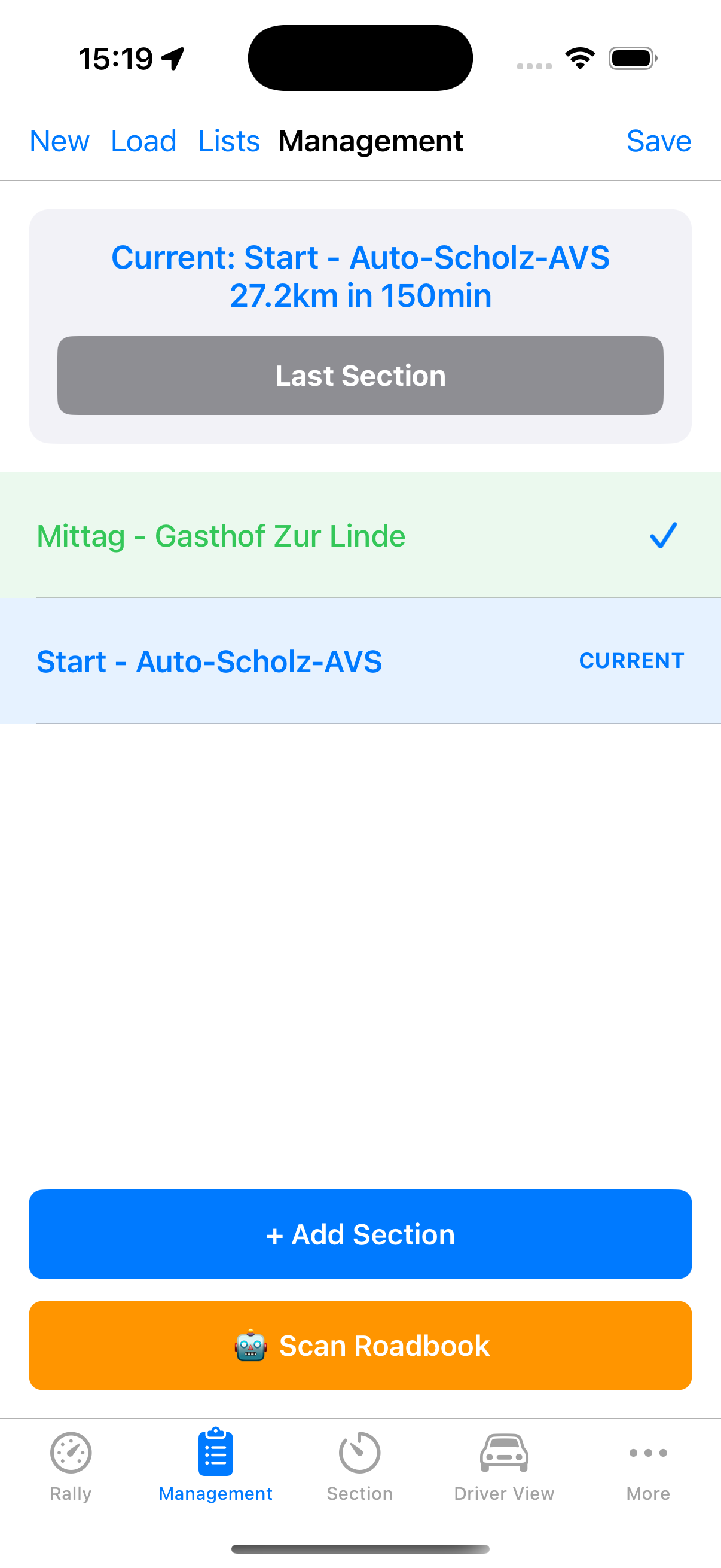
Section list with roadbook scanner
Creating Sections
- Name/designation of the section
- Target distance in kilometers or miles
- Target time in minutes and seconds
- Automatic calculation of average speed
Managing Sections
- Edit existing sections
- Delete unneeded sections
- Overview with all section data
- Status display (pending, active, completed)
🤖 AI-Powered Roadbook Scanner
Save time capturing sections - let artificial intelligence do the work.
Scan roadbook with AI support
How It Works
- Photograph a page of your roadbook with the camera
- AI analyzes the image and recognizes section data
- Extracted data: section names, distances, times, speeds
- Review and confirm the recognized data
- Import sections directly into the app
Supported AI Providers
- OpenAI (GPT-4) - Powerful image analysis from OpenAI
- Claude (Anthropic) - Precise recognition with Claude
- Google Gemini - Google's multimodal AI model
Note
For the AI function, you need an API key from the respective provider. You can store this in the settings.
📊 Trip Meter (Distance Counter)
Precise distance measurement with extensive calibration options.

Distance counter with calibration
Multiple Counters
- Section Counter - Independent counters for individual segments
- Daily Counter - Total distance of the current day
- Total Counter - Cumulative total distance
- All counters individually resettable
Calibration
- Calibration factor adjustable from 0.5x to 2.0x
- Compensates for GPS inaccuracies
- Adaptation to different terrain types
Units & Precision
- Switchable between kilometers and miles
- Adjustable decimal places (0-3 decimal points)
- Large, easy-to-read display
⏲️ Multi-Timer System
Flexible timers for various requirements during the rally.

Driver view with real-time timing
Timer Modes
- Stopwatch - Simple time measurement with start/stop
- Target Time Test - Specify time and distance, calculate required speed
- Regularity Check - Verify speed consistency over distance intervals
Features
- Multiple independent timers simultaneously
- GPS-based distance measurement for calculations
- Clear results display
📝 Rally Log
Complete documentation of all rally results for post-analysis.
Settings and configuration
Recorded Data
- Section name and number
- Target distance and target time
- Actual distance and time
- Average speed
- Time delta (deviation from target time)
- Status: On time, too slow, or too fast
Statistics
- Total rally time
- Total distance
- Average deviation
- Number of sections by status
Export Functions
- CSV Export - Table format for Excel/Numbers
- PDF Export - Printable document with all details
- Easy sharing via email or messenger
🆘 Safety Features
For your safety during the rally.
SOS Button
- Quick access to emergency services
- Configurable emergency number
- Direct call function in emergencies
Share GPS Coordinates
- Share current location with others
- Helpful for service teams and emergencies
- Can be enabled in settings
🌙 Display Options
Optimal readability under all conditions.
Night Mode
- Red-tinted display for night driving
- Preserves the driver's night vision
- Toggleable in settings
Large Font
- 1.3x font enlargement
- Better readability while driving
- Ideal for quickly reading important values
Themes
- System - Follows iOS settings
- Light - Light background
- Dark - Dark background (default)
Ready for Your Rally?
Download OldTimer Rally Timer now and experience professional rally timing.